One developer is currently available to jump onto a project!
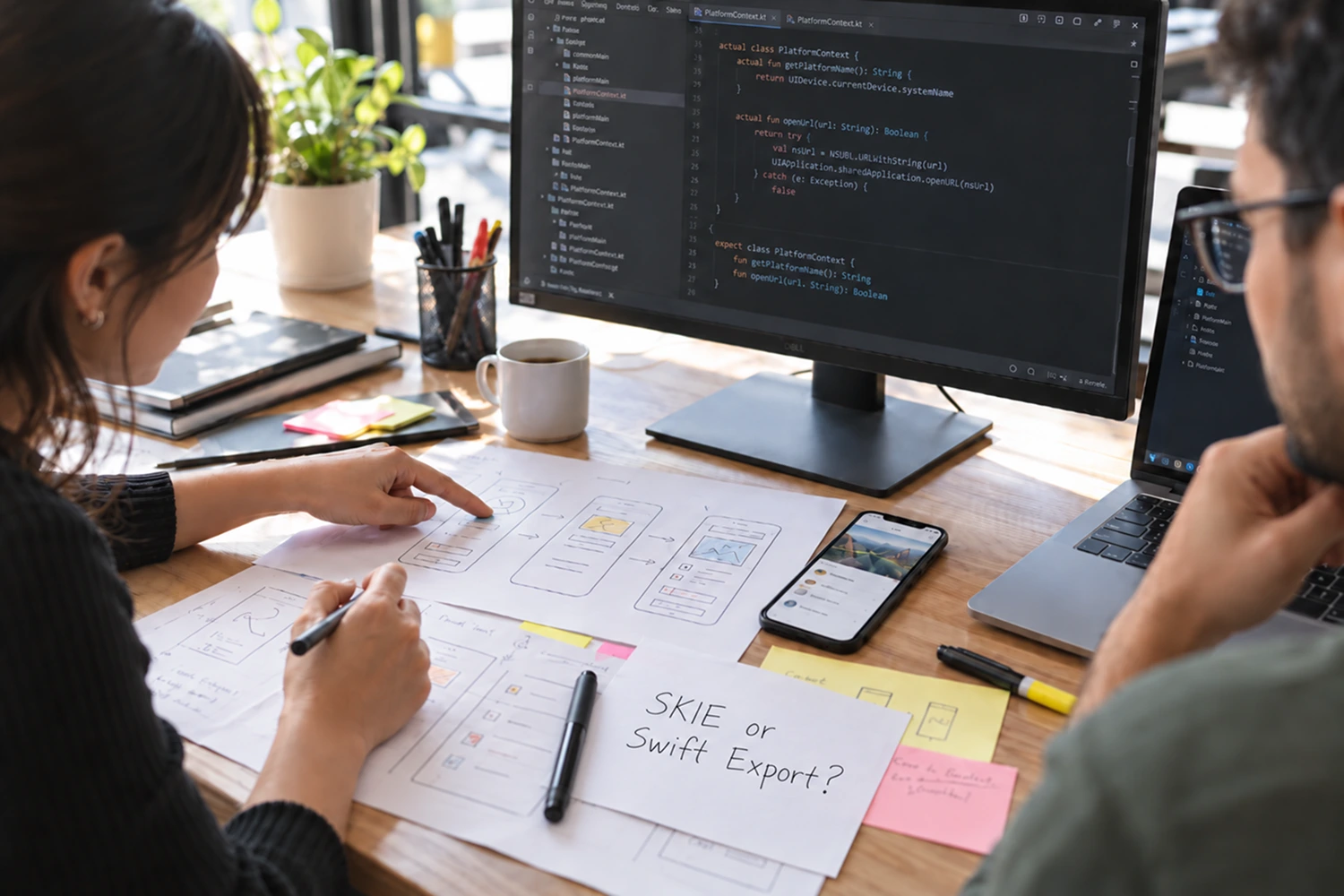
This Is How Our Engineers Build KMP Apps
This Is How Our Engineers Build CMP Apps
AI-Assisted Compose Multiplatform Migration: Our Claude Code Workflow
Our Kotlin Multiplatform to Compose Multiplatform migration covered 12 production screens, an existing shared business-logic layer, and separate Android and iOS interfaces. Because the developer leading the work had built the original KMP application, we expected the transition to a shared Compose UI to be relatively well controlled.
It still took approximately two weeks. An early attempt to move too much of the Android UI into commonMain produced more than 10,000 compile errors, including missing imports, deprecated libraries, and Android-only APIs.
The hardest blockers were not caused by Compose UI itself. They appeared where shared code met platform behavior: permissions, lifecycle handling, expect/actual boundaries, Firebase configuration, and native iOS dependency management. We introduced Claude Code partway through the project to shorten repeated research and debugging cycles around those problems.
It did not replace architectural judgment, native platform validation, or human code review. This article explains where the AI coding assistant helped, what remained the responsibility of experienced mobile engineers, and the migration playbook we would use from the beginning next time.
Key Takeaways
- Architecture, native integrations, and platform boundaries create more migration risk than moving Compose UI code into
commonMain. - Claude Code was most useful for bounded work: explaining unfamiliar iOS APIs, proposing reviewed
expect/actualimplementations, comparing dependency configurations, and classifying compile errors. - An incremental migration, validated feature by feature on Android and iOS, provides a safer feedback loop than moving the complete UI layer at once.
- AI-generated code still requires human architectural review, clean builds, and runtime validation on both platforms.
- Enterprise teams should audit architecture and dependencies before AI-assisted refactoring begins.
What We Were Migrating from KMP to Compose Multiplatform
The existing application already shared domain rules, data handling, and other business logic between Android and iOS. Each platform still owned its interface: Jetpack Compose on Android and native SwiftUI or UIKit components on iOS.
The goal was to migrate 12 screens to shared Compose UI, not to eliminate native development or place every responsibility in commonMain. Permissions, lifecycle integration, context-dependent functionality, native SDK configuration, and selected platform APIs still required dedicated Android and iOS implementations.
Familiarity with the original architecture helped us locate business logic and follow existing data flows, but it did not remove migration risk. Moving from shared logic to shared UI changes where platform boundaries appear. Android code that depends on Context, lifecycle callbacks, permissions, or Android-only libraries cannot simply move into commonMain.
The iOS target introduced a different class of problems. Firebase configuration, Swift Package Manager, CocoaPods, and lifecycle differences affected whether the project built and behaved correctly. Sharing UI was achievable only after we identified which responsibilities genuinely belonged in shared code and which needed to remain native.
For a complete technical migration sequence, see our Kotlin Multiplatform to Compose Multiplatform migration guide.
Where an AI Coding Assistant Helped During the Migration
Shared business logic and ViewModels were comparatively straightforward because the KMP project already separated them from platform UI. The difficult work began when Android-specific permissions, lifecycle behavior, context usage, and native integrations had to be represented behind carefully chosen platform boundaries.
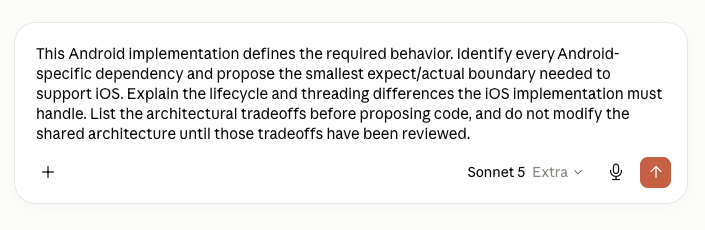
Claude Code was useful when we gave it a working reference implementation and a narrow question. The team first implemented and validated behavior on Android, the platform we knew best. We then used that code as context to investigate the closest iOS API, identify lifecycle or threading differences, and propose a small actual implementation for developer review.
It also helped us:
- locate Android-only dependencies within a selected feature;
- group compile errors by likely cause rather than address them in arbitrary order;
- explain iOS APIs relative to known Android behavior;
- compare alternatives to deprecated or unsupported libraries;
- inspect CocoaPods and Swift Package Manager configuration differences;
- prepare code-review checklists covering assumptions, edge cases, and runtime risks.
The useful unit of work was never “write the feature.” It was a specific blocker with explicit boundaries and a required validation step.
Example: Debugging Native iOS Dependencies
One of the clearest examples involved native iOS dependencies. Swift Package Manager resolved the packages and Xcode recognized them, but the project still failed to build without an obvious root cause.
We later switched to CocoaPods and used Claude Code to compare both configurations and investigate the setup. We cannot attribute the original failure to a confirmed single cause because the available build output did not support that conclusion. The value of the assistant was narrower: it helped us explore configuration differences and test hypotheses faster while the developers remained responsible for the diagnosis and build validation.
In this migration, the largest delays came from platform-specific integrations rather than shared Kotlin code. Firebase, native SDKs, and third-party KMP libraries created combinations that were not always covered clearly by one source of documentation. An AI assistant with relevant codebase context reduced repeated research, but it did not turn uncertain evidence into a verified root cause.
Our AI-Assisted Compose Multiplatform Migration Playbook
The workflow below separates developer ownership from work that can be delegated to Claude Code. Each phase ends with validation because plausible code and successful compilation are not sufficient evidence of correct mobile behavior.
This process keeps the migration incremental and the AI context focused. It also prevents a locally plausible implementation from expanding the shared layer before its lifecycle, threading, and dependency assumptions have been verified on both platforms.
The Claude Code configuration also affects how much repository context the assistant receives, how efficiently it completes bounded tasks, and how quickly token usage grows during longer sessions. Our comparison of five Claude Code configurations and their token usage provides additional context for teams designing an AI-assisted development workflow around larger codebases.

Claude Code Prompt Patterns for KMP-to-CMP Migration
Broad prompts such as “migrate this screen to Compose Multiplatform” give an AI coding assistant too much room to make architectural assumptions. A useful prompt defines the reference behavior, permitted scope, expected analysis, and validation that still belongs to the developer.
Identify the Smallest Platform Boundary
Investigate Native Dependency Configuration
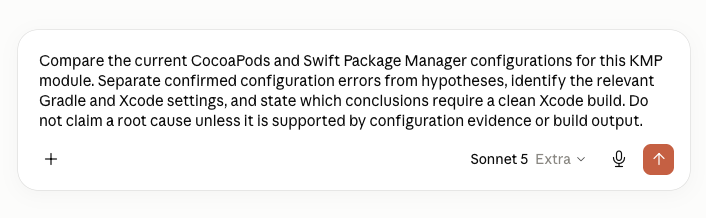
Both prompts force uncertainty into the open. Claude Code can support codebase understanding and investigation, but developers still decide whether the proposed boundary or dependency change fits the long-term architecture.
What We Did Not Delegate to the AI Coding Assistant
Claude Code provided engineering input; it did not own the migration. Experienced mobile engineers retained responsibility for:
- the long-term Compose Multiplatform architecture and UI ownership model;
- final placement of
expect/actualboundaries; - approval of dependency replacements after evaluating platform support, maintenance, licensing, API stability, and migration cost;
- confirmation of iOS lifecycle, threading, permissions, state restoration, and native SDK behavior at runtime;
- security and compliance decisions involving authentication, storage, logging, permissions, external SDKs, or regulated data;
- merge approval after manual code review and successful Android and iOS build validation.
These boundaries matter because a buildable implementation can still be architecturally inappropriate or fail under real lifecycle conditions. AI-generated changes were reviewed against the existing system, tested on the affected platforms, and treated with the same production standards as developer-written code.
Planning a Kotlin Multiplatform to Compose Multiplatform migration? Before moving UI code into commonMain, audit native dependencies, platform boundaries, and the parts of the application that should remain native. Our Kotlin Multiplatform development approach explains how we evaluate architecture, migration risk, and enterprise team readiness.
Can AI Reduce the Cost of a Compose Multiplatform Migration?
AI can reduce research and debugging time, but we would not claim a fixed saving in days or percentage. The result depends on the codebase, architecture, dependencies, team experience, and amount of platform-specific work.
In this project, Claude Code shortened the periods spent investigating unfamiliar iOS behavior and configuration differences. Its value came from keeping research close to the code and allowing the team to test narrower hypotheses, not from generating most of the application.
That distinction matters for enterprise planning. AI-assisted development is most useful as part of a controlled modernization workflow with architecture review, incremental delivery, and native platform validation. It is not a substitute for KMP, Compose Multiplatform, or iOS expertise.
Teams evaluating whether this investment fits their broader mobile strategy should also consider the maturity and production adoption of the ecosystem. Our analysis of Kotlin Multiplatform adoption and production use in 2026 provides additional context for that decision.
If the architecture is already defined but the team lacks experienced KMP, Compose Multiplatform, or iOS capacity, team augmentation may be more appropriate than outsourcing the entire migration.
Conclusion
The main lesson from this project was not to introduce more code generation. It was to identify platform risk before moving the UI, migrate one feature at a time, and use AI only for bounded tasks whose output could be verified.
Claude Code helped us inspect unfamiliar APIs, compare dependency configurations, and reason about platform equivalents. Architecture, native behavior, security, maintainability, and production readiness remained the engineering team’s responsibility.
A KMP-to-CMP migration should begin with architecture and dependency risk, not with moving the entire UI into commonMain. If you want a second opinion on migration scope, shared UI boundaries, native integrations, or the role AI-assisted coding should have in the process, talk to the Aetherius mobile engineering team.
to Build Your App?
%201.webp)