One developer is currently available to jump onto a project!
This Is How Our Engineers Build KMP Apps
This Is How Our Engineers Build CMP Apps
We Tested 5 Claude Code Configurations: Here's What Cuts Token Usage by 80%
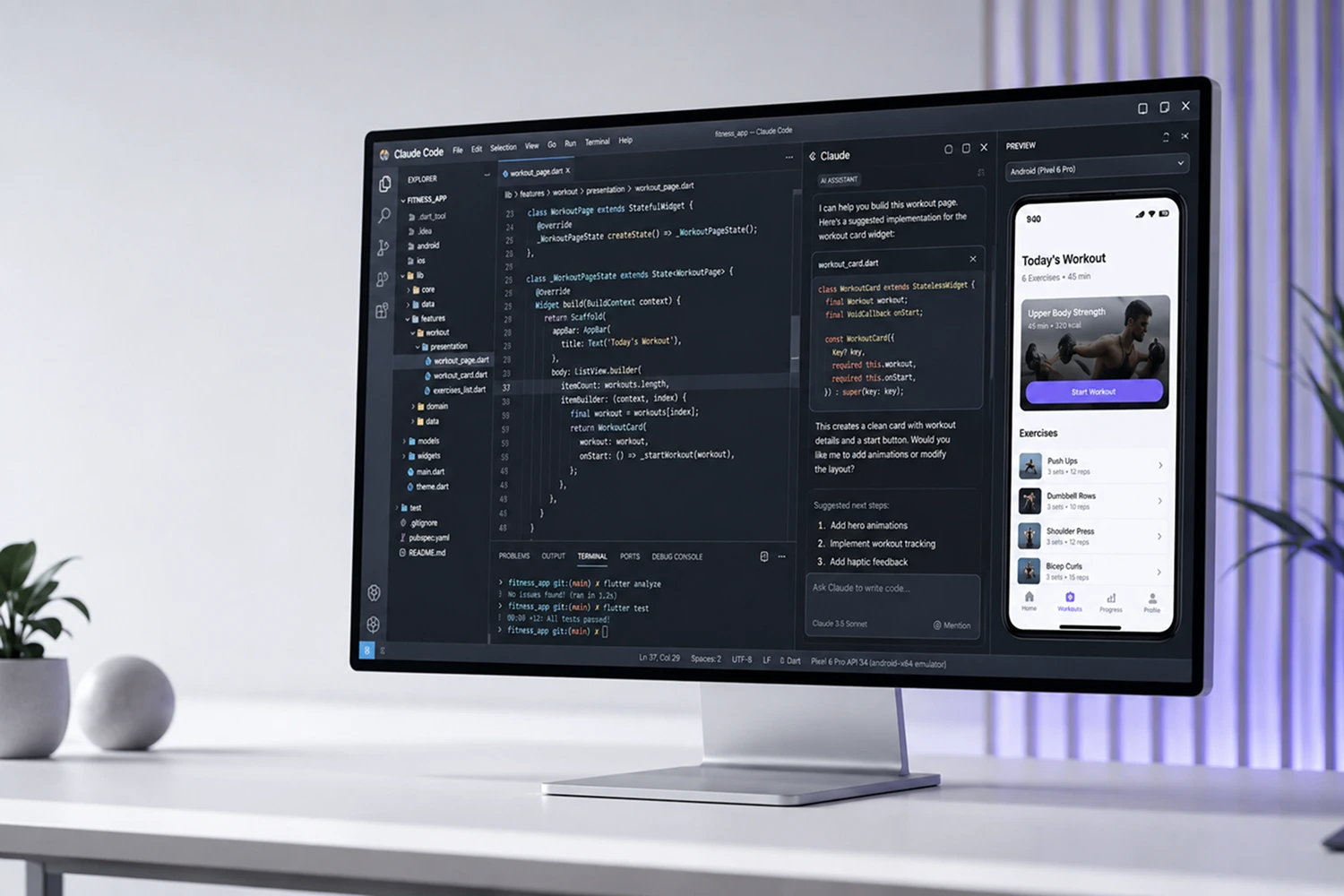
If you've spent any serious time with Claude Code, you know the feeling. You open a session, start working, ask a few questions about your codebase, run a build, and somewhere halfway through your afternoon, you hit a wall. Token limit exceeded.
And the frustrating part isn't the limit itself, it's that you never really know how fast you're burning through it until it's too late.
That's exactly why I sat down with Caner Tatar, Engineering Manager and one of the most hands-on people I know when it comes to integrating AI into mobile development workflows. Caner has been in the mobile space since 2011, as an engineer, a manager, a founder, and over the past year he's done something most people haven't: he actually measured this stuff.
He took a real iOS codebase, defined a concrete task, and ran it across 5 different Claude Code configurations, from a completely naked setup with nothing configured, all the way to a fully optimized environment with module-level context files, skills, subagents, and memory.
The right configuration cut token usage by up to 80%. The wrong one burned through nearly half a 200K context window on a single task.
We recorded the whole conversation as part of our live session series at Aetherius, and I'd strongly recommend you listen to it in full. But if you want the written version, that's what this post is.
Let's get into it.
Why Claude Code Burns Through Tokens Faster Than You Think
Most people, when they first start using Claude Code seriously, assume the 200K context window is basically infinite, or at least, more than enough for a normal working day. And that's a reasonable assumption until you actually start watching what happens inside a session.
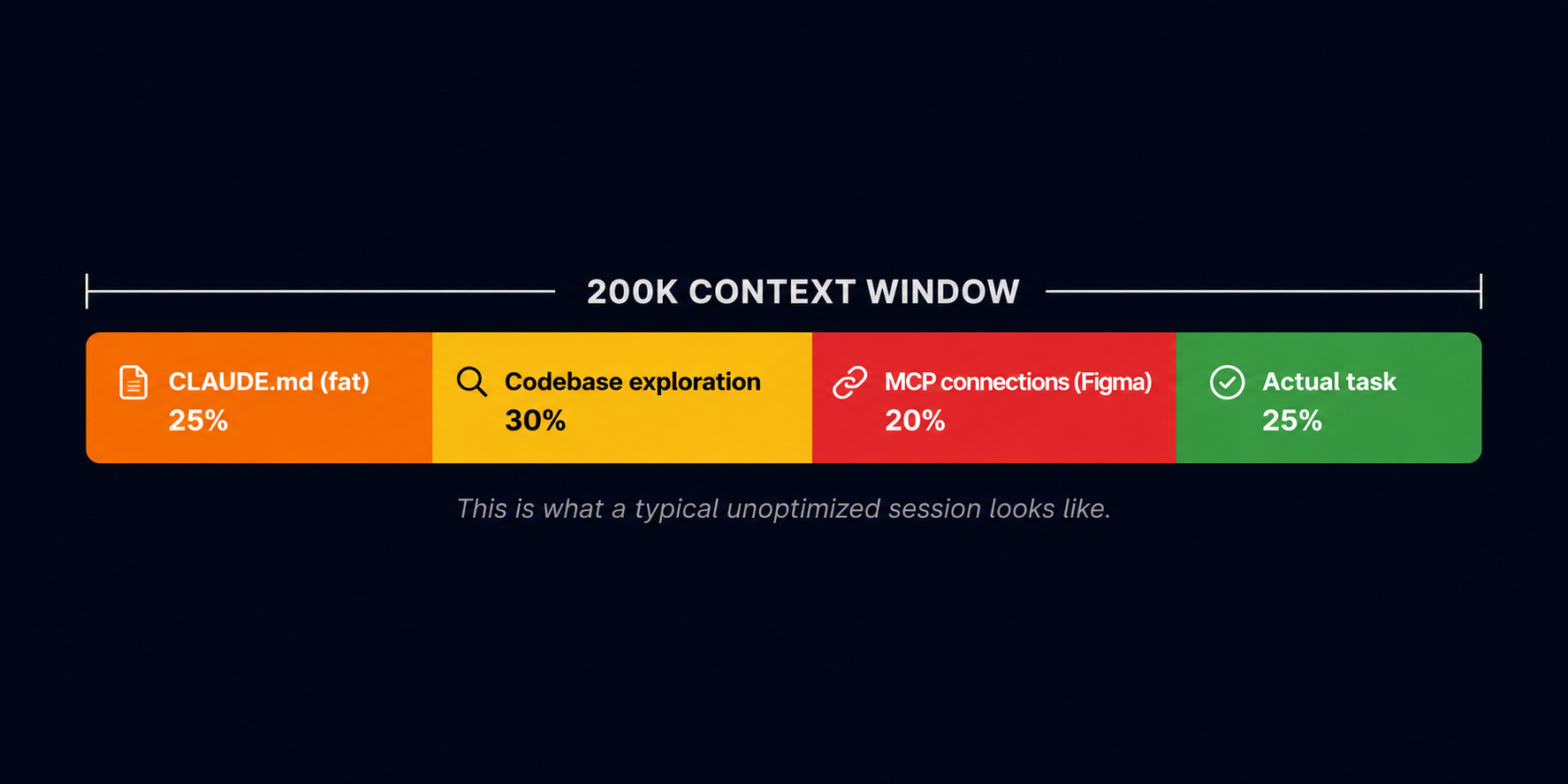
The thing is, the context window doesn't just fill up with your code. It fills up with everything: every file Claude reads while exploring your codebase, every line of build output, every MCP response, every tool call result. And it fills up fast, in ways that aren't immediately obvious when you're just focused on getting the task done.
What made Caner's experiment so useful is that he measured this. Same codebase, same task, same model, five different configurations. And the baseline result, with nothing configured, was brutal: a single task like implementing pull-to-refresh on an e-commerce catalog burned through somewhere between 58K and 100K tokens depending on the setup. That's up to half your session gone on one feature, before you've even touched anything else.
So where does it actually go?
The CLAUDE.md Kitchen Sink Problem
The first place to look is your CLAUDE.md file, or whatever root config file you're using, whether that's a CursorMD, AgentsMD, or something similar. The concept is the same across tools: one file where you dump context about your project so the AI knows what it's working with.
The problem is that this file gets loaded into the context window on every single query you run. So if your CLAUDE.md has grown over time, and it always does, because it starts at 100 lines and slowly becomes the dumping ground for everything your team ever wanted the AI to know, you're paying that token cost upfront, on every request, whether it's relevant or not.
For small codebases this is manageable. But if you're working on a 5-year-old mobile codebase with dozens of modules, a bloated root file can easily eat 50K tokens before Claude has even looked at a single line of your actual code. And there's another problem on top of that: not all parts of the context window perform equally.
The research Caner referenced, including some of Andrej Karpathy's work on this, shows that the first half of the context window is where the model is most accurate. The second half is where it starts to get confused, starts agreeing with things it shouldn't, starts hallucinating. So filling that first half with a bloated config file isn't just wasteful, it's actively making your results worse.
The Codebase Exploration Tax
The second big drain is something Caner calls the exploration tax, and it's one of those things that feels completely normal until you realize what it's costing you.
Every time you ask Claude something open-ended, like "what does this module do?", "how is this feature structured?", "where should I add this?", it doesn't just look in one place. It reads around, opens source files, reads through them, cross-references other files, checks tests, maybe reads your project file.
And if your source files are 200, 300, 500 lines each, and there are many of them, that exploration adds up to thousands of tokens before Claude has even started forming an answer.
The issue isn't that Claude is being inefficient, it's actually doing exactly what you'd want a thorough engineer to do. The issue is that without proper context structure, it has no choice but to explore broadly, because it doesn't know where to look. Give it a map, and it can go straight to the right place. Without one, it wanders.
MCP Connections, Figma Especially
The third drain is one that catches a lot of people off guard, especially as MCP integrations become more common in AI-assisted workflows. Every MCP connection has a token cost, that's just the reality of how they work, but some are significantly more expensive than others, and Figma is the one Caner called out specifically.
If you point Claude at a Figma MCP connection and just say "here's the project, go implement this screen," it will read everything it can access: the full file, all the components, all the layers, all the metadata. That can dump an enormous amount of tokens into your context window before any actual coding has happened.
The fix is simple but easy to overlook: always give Claude a direct link to the specific screen you're working on, not the full file. That one habit alone meaningfully reduces token burn on any UI-related task.
The same principle applies to Jira, Linear, Asana, any MCP that connects to a data source. The more precisely you point it, the less it reads, and the less it costs you.
How We Tested: The 5 Configurations
Before we get into the results, let me give you some context on how we actually ran this, because the methodology matters.
The codebase was a real iOS project, not something synthetic or purpose-built for the experiment. The task was consistent across all five configurations: implement pull-to-refresh on an e-commerce product catalog. Simple enough to be repeatable, complex enough to require Claude to actually explore the codebase, read source files, understand the existing patterns, and produce something that fits.
The model was Claude Sonnet throughout. Caner reasons that Sonnet is the right baseline for this kind of work because it sits at the sweet spot between capability and cost for daily coding tasks. Opus is better for planning and deep architectural thinking, but for execution (writing code, running tasks, implementing features) Sonnet-level models are what you'd actually use in a real workflow.
What we measured across each configuration was token usage per session, time to complete the task, and qualitative output quality. The experiment was designed to isolate each variable as cleanly as possible, adding one layer of optimization at a time, so you can actually see where the gains are coming from rather than just comparing a completely naked setup to a fully optimized one and calling it a day.
Here's what the five configurations looked like, and what happened at each stage:
A few things worth noting before we go deeper into each lever.
First, the baseline result: 100K tokens on a single task with no configuration is genuinely alarming when you think about it in practical terms. That's half your 200K context window gone before you've done anything else in your session. If you're working on a feature that requires multiple back-and-forth exchanges, running builds, checking errors, iterating on output, you're hitting the wall within a couple of hours, sometimes less.
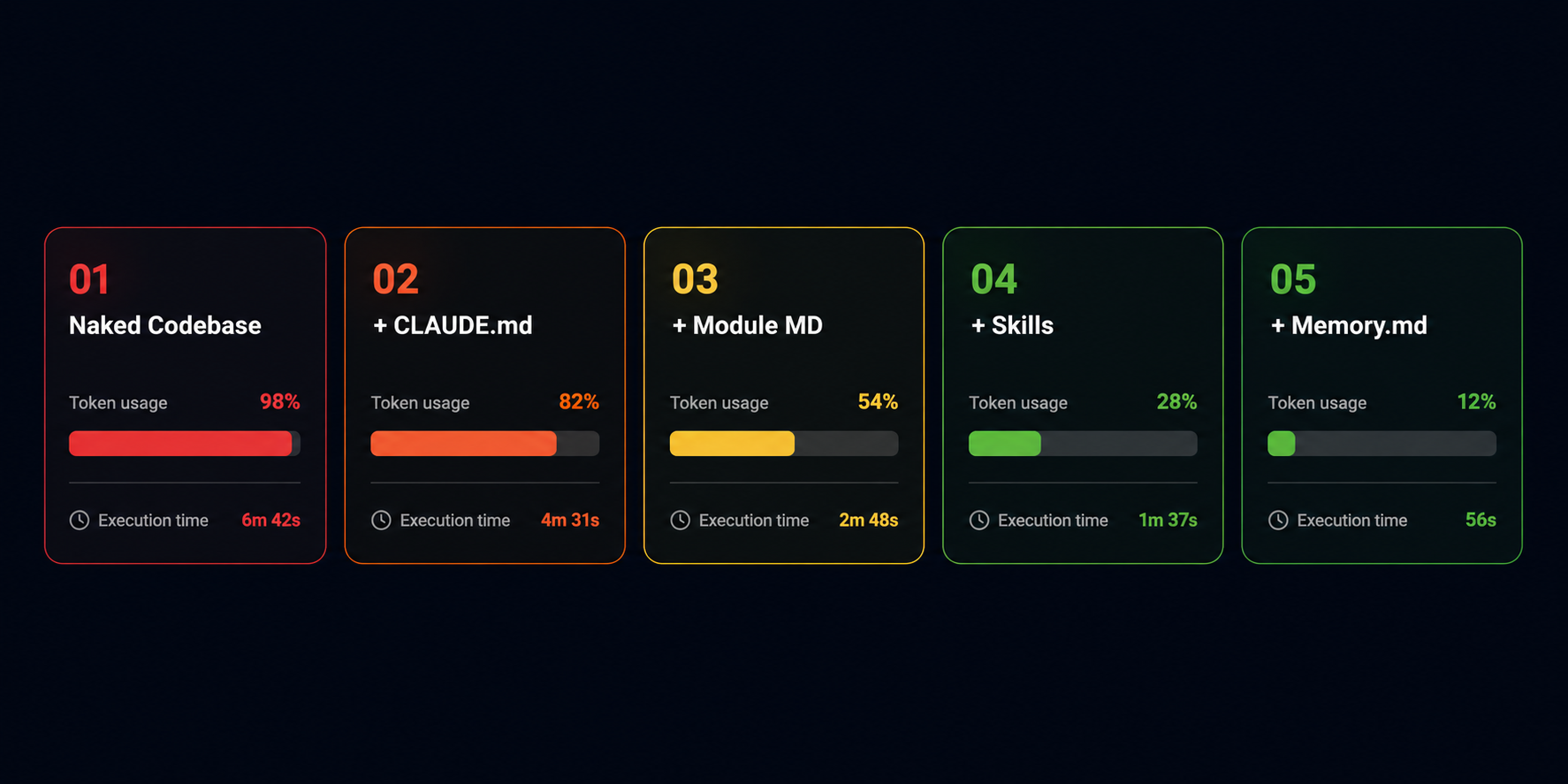
Second, the improvement from configuration 1 to configuration 2: just adding a well-structured CLAUDE.md file, already cut both token usage and task duration significantly. That's the lowest-effort change you can make, and it has an immediate, measurable impact. Most of the people I talk to who are frustrated with token burn haven't done even this much.

Third, and this is the part that surprised me most: the really dramatic savings don't come from one big change. They come from stacking these layers on top of each other. Each lever compounds the effect of the previous one, and by the time you have all five in place, you're operating in a fundamentally different environment than where you started. The 80% reduction isn't from one clever trick, it's from systematically removing every source of unnecessary token consumption, one at a time.
One more thing worth flagging here: the break-even point for this level of setup investment is around 12 modules. If your codebase is smaller than that, you'll still see benefits, mainly in speed, not so much in token savings, but the ROI really kicks in once you're working at scale. For a mobile codebase of any serious size, that threshold is almost always crossed.
Now let's go through each lever in detail.
4 Levers That Stop Claude Code From Burning Tokens
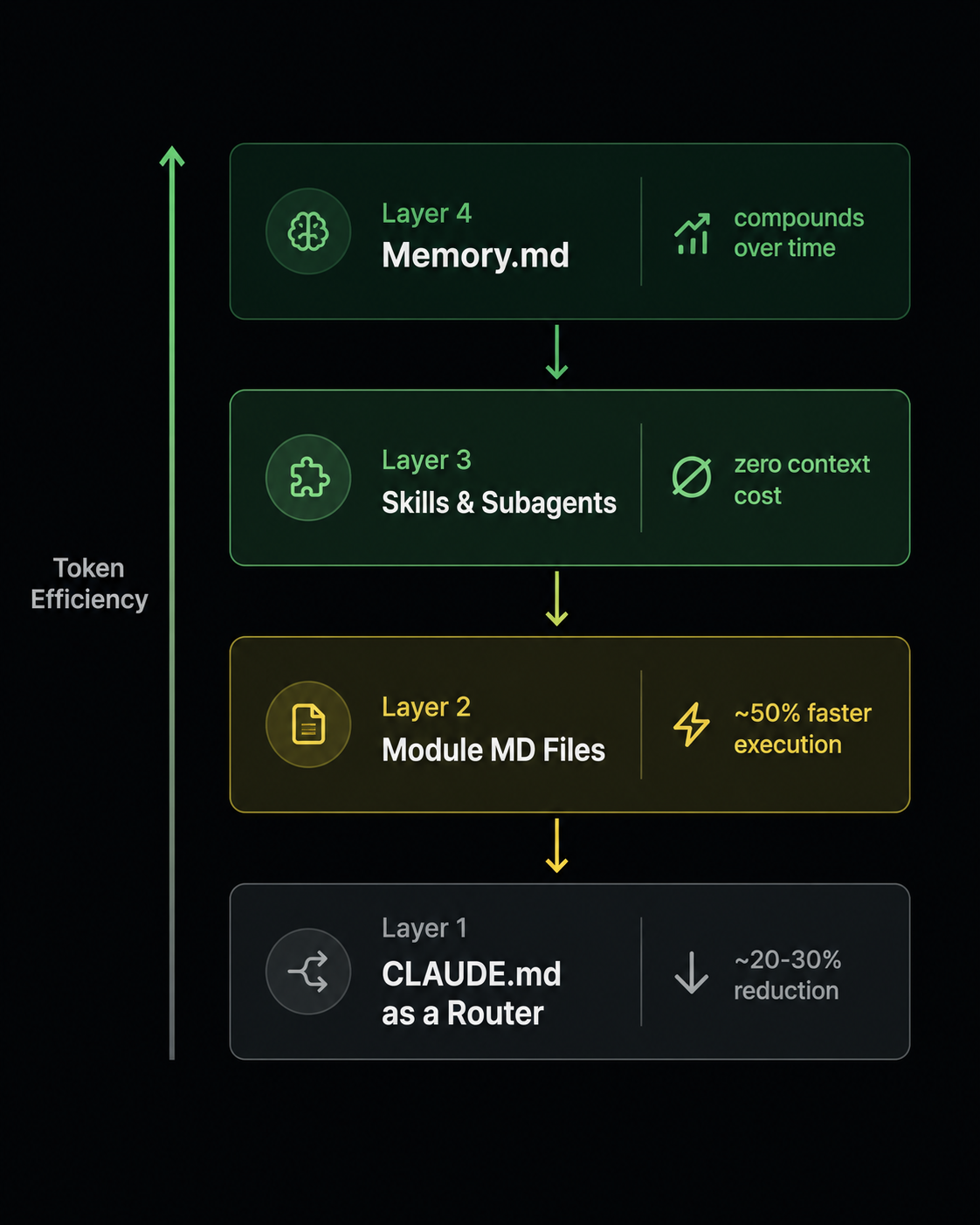
Lever 1: CLAUDE.md as a Router, Not a Content Store
The single most common mistake in teams that are starting to use Claude Code seriously is treating CLAUDE.md as a place to put everything. Project history, architecture decisions, coding conventions, onboarding notes, API documentation, component descriptions, it all ends up in one file because it feels like the right place for it. The AI needs context, here's the context, problem solved.
Except it isn't solved, because that file gets loaded on every single query, and over time it becomes a liability rather than an asset. The fix isn't to delete it, it's to completely rethink what it's supposed to do.
Think of CLAUDE.md not as a content store but as a routing layer. Its job is to tell Claude where things are, not what they are. It should answer questions like: how is this project structured, where do I find the networking layer, how do I run the build, what are the naming conventions, which module handles authentication. Short, precise, directional. If Claude needs to know more about a specific module, the root file should point it there, not contain the information itself.
In practice this means your root CLAUDE.md should be lean enough that loading it on every query costs you almost nothing, while still being specific enough that Claude never has to wander. A good target is somewhere between 100 and 200 lines, enough to orient, not enough to overwhelm. If it's growing beyond that, it's a signal that information is ending up there that belongs somewhere else.
Lever 2: Module-Level MD Files That Load on Demand
Once your root file is acting as a router, the next step is giving it somewhere useful to route to. That's where module-level MD files come in, a separate context file living inside each module of your codebase, containing everything Claude needs to know specifically about that module and nothing else.
The key difference from the root file is when they get loaded. Module MD files are only pulled into the context window when Claude is actively working in that module. If you're implementing something in the networking layer, Claude loads the networking MD file. It doesn't load the design system MD file, the feature catalog MD file, or anything else that isn't relevant to the task at hand. You're paying only for the context you actually need, at the moment you actually need it.
What goes in a module MD file is fairly straightforward: what this module does, what it depends on, how it's structured internally, any conventions or patterns specific to this part of the codebase, known issues or gotchas. Essentially, the kind of thing a senior engineer would tell a new team member before sending them to work in that area for the first time.
When we introduced this layer into the experiment, the improvement in task execution time was roughly 50% compared to the naked baseline, and this was on a moderately sized codebase. On larger projects with more modules, the impact scales up considerably, because the amount of irrelevant context you're keeping out of the window grows with every module you add.
Lever 3: Skills and Subagents Are Essentially Free
This is the one that tends to surprise people the most, and it's worth spending a moment on why it works the way it does.
A skill, in the Claude Code context, is essentially a reusable set of instructions for a specific type of task: think of it as a lightweight procedure that Claude can follow without needing to figure out the approach from scratch every time.
The important thing about skills from a token perspective is that they don't live in the context window. They're loaded and executed in a way that doesn't consume your session's token budget, which means you can define skills for your most common tasks ( running tests, generating boilerplate for a specific pattern, updating documentation, handling a specific type of bug), and use them repeatedly without paying a context cost for any of it.
Subagents work on a similar principle but at a higher level. Instead of one agent handling a complex task sequentially, you spin up multiple agents working in parallel, each with its own clean context window.
This is particularly useful for tasks that touch multiple parts of a codebase simultaneously, because each subagent is only loading the context relevant to its specific piece of work. The overhead doesn't compound the way it does in a single long session, it stays flat regardless of task complexity.
Skills and subagents are where the workflow starts to feel genuinely different, less like prompting a tool and more like orchestrating a small team. If you wan to know how we're applying this kind of AI-powered mobile development in production environments, that's a separate conversation worth having.
The practical implication is that once you've identified the repetitive, well-defined tasks in your workflow, the ones where Claude is essentially doing the same kind of work over and over, wrapping them in skills is one of the highest-leverage things you can do. It stops token consumption on those tasks completely.
Lever 4: Memory.md as a Living Document
The fourth lever is slightly different from the first three in that its value compounds over time rather than delivering an immediate one-time saving. Think of it less as an optimization and more as an investment that pays increasing returns the longer you maintain it.
The idea is simple: a memory file that tracks what your AI environment has learned about your specific codebase, your team's patterns, and your project's history. Good practices that have emerged, bad approaches that have been tried and failed, recurring issues, hotfixes that were applied and why, decisions that were made and the reasoning behind them. The kind of institutional knowledge that usually lives in people's heads and gets lost when they leave.
The important thing here is that you don't maintain this file manually; that would defeat the purpose entirely. Instead, you instruct your AI environment to keep it up to date as part of its normal operation. Every time something worth remembering happens in a session, Claude writes it to the memory file. Over time, the file becomes a progressively more accurate and useful representation of your project's history, and Claude gets progressively better at working within your specific context without needing to rediscover things it's already learned.
From a token perspective, a well-maintained memory file reduces exploratory behavior over time. Claude already knows where the bodies are buried, so it doesn't need to go looking. Combined with the other three levers, it's what pushes the overall savings from "meaningful" to "transformative."
Bonus: MCP Tips That Save Tokens
MCPs are genuinely powerful, because of the ability to point Claude directly at your Figma files, your Jira board, your Linear tickets and have it work from real project context rather than descriptions of that context is a meaningful step forward in how AI-assisted development actually works in practice.
But every MCP connection has a token cost, and if you're not deliberate about how you use them, they can quietly drain your context window before you've written a single line of code.
The general principle is simple: the more precisely you point an MCP, the less it reads, and the less it costs. Here's what that looks like in practice for the tools we use most.
1. Figma
Always give Claude a direct link to the specific screen you're working on, never the full file. When you point at a full Figma file, Claude will read everything it can access, all components, all layers, all variants, all metadata, because from its perspective, all of it could be relevant. When you give it a specific screen link, it reads only what it needs. That one habit alone makes Figma MCP genuinely usable without it becoming your biggest token drain.
2. Jira and Linear
Save your project ID or board ID directly in your CLAUDE.md file. Without it, Claude has to query the MCP to discover where things are every single time it needs to interact with your board, and that discovery process costs tokens on every request. With the ID already in the root file, it goes straight there. It's a small thing to set up once and then never think about again.
3. The broader rule
Before enabling any MCP connection, ask yourself how much data it could potentially pull into the context window on a single call. If the answer is "a lot, depending on what Claude decides to read," then you need guardrails, specific links, saved IDs, and scoped permissions before you start using it in a real session. MCPs that connect to large data sources without constraints are one of the fastest ways to burn through a context window, and the cost isn't always obvious until you're already halfway through your token budget.
When Does It Pay Off?
Based on our experiment, the break-even point for investing in this kind of setup is around 12 modules. Below that threshold, the benefits are real but they show up mostly as speed improvements rather than dramatic token savings, your sessions run faster because Claude is better oriented, but you're not necessarily extending how long you can work before hitting a limit. Above 12 modules, the token savings become significant and scale progressively as the codebase grows.
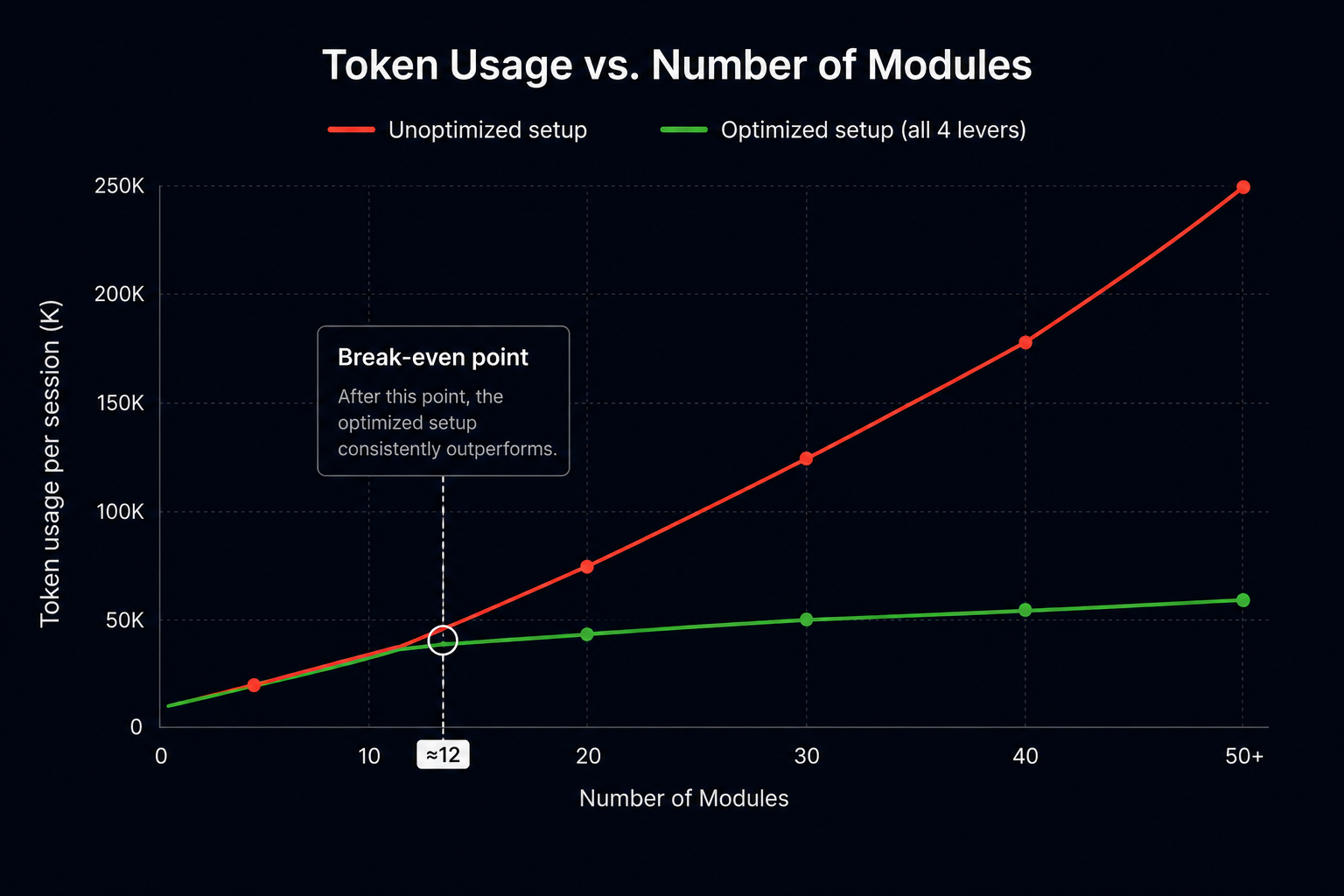
For any serious mobile codebase, iOS or Android, it doesn't matter; 12 modules is a threshold you've almost certainly already crossed. Most of the production mobile apps we've built at Aetherius are well beyond that, which means the full setup pays for itself almost immediately in reduced friction and longer, more productive sessions.
The upfront investment is also smaller than it might sound. A well-structured root CLAUDE.md takes an hour or two to write properly. Module MD files can be created incrementally as you work in each area, you don't need to write all of them before you start seeing benefits. Skills can be defined on demand as you notice repetitive patterns in your workflow. And the memory file, as we covered, maintains itself. None of this requires a dedicated sprint or a team initiative. It's the kind of thing one person can implement gradually, starting today.
Key Takeaways
- CLAUDE.md is a router, not a content store. Keep it lean, keep it directional, and let it point Claude to the right places rather than trying to contain everything in one place.
- Module MD files load on demand. One per module, containing only what's relevant to that module. Claude pays the context cost only when it's actually working there.
- Skills and subagents don't touch your context window. Wrap your repetitive, well-defined tasks in skills and use subagents for parallel work, both are essentially free from a token perspective.
- Memory.md compounds over time. Let your AI environment maintain it, and it becomes progressively more valuable the longer you use it.
- Every MCP call has a cost. Be precise, specific screen links for Figma, saved IDs for project management tools, scoped access wherever possible.
Conclusion
Everything we covered here came out of a real experiment on a real codebase, and we went much deeper on all of it in our live session with Caner. If you want to hear the full conversation, including the Q&A where we got into Jira-to-Claude workflows, design system token naming, and how realistic fully autonomous code-to-PR pipelines actually are right now, the full webinar recording is available below.
Webinar: How not to spend all your tokens on AI-assisted coding
And if you're working on a mobile product and want to talk through how your team is set up for AI-assisted development, you can always contact us.
to Build Your App?